


|
SDL Model Checking
Following a long collaboration with ENSTA Bretagne research lab, PragmaDev has integrated in its latest release of PragmaDev Studio, ENSTA Bretagne model checker OBP (Observer Based Prover).Exhaustive simulation
The primary objective of model checking is to explore all possible scenarios in the model. During the exploration it is possible to detect dead locks, unreachable model branches, or verify properties.A language agnostic checker
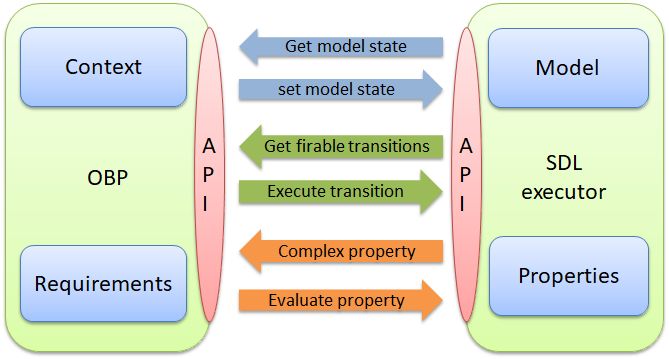
The key caracteristic of OBP is that it does not rely on a dedicated language. It relies on a third party executor to execute the model. In our case OBP is interacting with PragmaDev SDL executor to execute the transitions. OBP does not actually know anything about the model it is exploring. It is the same principle with the properties. OBP evaluates complex properties made of atomic properties that are evaluated by the execution engine.
Handling the state space
Communicating systems inherently create a lot of possible cases. This is due to the fact that their designs are based on concurrent state machines. This creates a lot of possible paths of execution. So we have implemented ways to reduce the exploration:- Fine tune the execution semantics
The following options aim at reducing the state space or getting closer to some specific execution environements.
- Message queues controls the order in which the messages can be received by the process instances.
- Initial transitions controls the priorty of initial transitions compared to the other ones.
- Continuous signals controls the semantics of continuous signals.
- Internal transitions controls the priority of internal transitions compared to transistions triggered by messages coming from the environment.
- Reduce the possible parameter values of the incoming messages as well as the number of messages.

The previous Studio version could only handle simple types. This version can handle any complex or structured type and set the possible values of each sub-fields. In this example only two values will be explored for the prio field in the CONNECT_ACK message. All the other field values are fixed and will not be explored.
- Exclude some internal variables from the global model state.
The value of each internal variable is part of the global system state evaluation. But sometimes different values of a variable do not have an impact on the overall system behovior making it irrelevant to explore. It is possible to indicate if an internal variable should be considered in the system state.
This new version makes an automatic analysis of the model and can preset a number of internal variables to be part of the global system state or not. For example a variable does not need to be included in the system state if it is always set before it is read in this transition.
